
1. Fampidirana
Misaotra anao nividyasing the UHAPPY U18 Portable Mini HD LED Projector. This manual provides essential information for the safe and efficient operation of your device. Please read it thoroughly before use and retain it for future reference.
Fiarovana fiarovana
- Aza mijery mivantana amin'ny family projector rehefa mandeha ny lamp mandeha.
- Hamarino tsara ny rivotra manodidina ny projecteur mba hisorohana ny hafanana be loatra.
- Aza atao amin'ny orana na hamandoana ny projector.
- Ny adaptatera herinaratra omena miaraka amin'ny projecteur ihany no ampiasao.
- Aza manandrana manokatra na manamboatra ny projecteur samirery. Ampahafantaro ny mpiasa mahafeno fepetra ny fanamboarana rehetra.
2. Vokatra mihoatraview
Familiarize yourself with the components and ports of your UHAPPY U18 projector.
Fonosana fonosana
The following items are included in your projector package:

Image: Contents of the UHAPPY U18 projector package, including the projector, power adapter, AV cable, remote control, and user manual.
- UHAPPY U18 Mini LED Projector
- Power Adapter
- AV tariby
- Fanaraha-maso lavitra
- User Manual (ity antontan-taratasy ity)
Projector Components and Ports

Image: Angled top-down view of the UHAPPY U18 projector, highlighting the lens, focus adjustment, and control panel.

Sary: Top view of the UHAPPY U18 projector, showing the integrated control buttons.

Sary: Front view of the UHAPPY U18 projector, focusing on the projection lens.
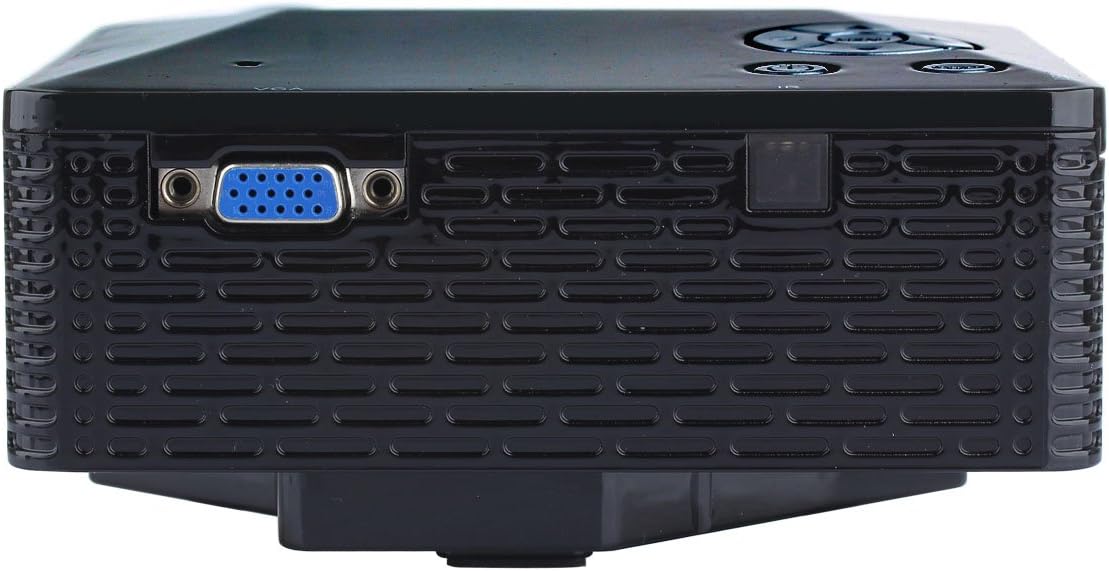
Sary: Side view of the UHAPPY U18 projector, illustrating the VGA input port.
The projector features various input ports for connectivity:
- Fampidirana HDMI: For connecting devices like laptops, gaming consoles, or media players.
- Port USB: For connecting USB storage devices to play media directly.
- Slot karatra SD: For inserting SD memory cards to play media directly.
- AV Input: For connecting older devices using the included AV cable.
- VGA fidirana: For connecting computers or laptops with a VGA output.
- DC-IN: Seranana fampidiran-kery.
- Output écouteur: For connecting external audio devices or headphones.
- Focus Knob: Located near the lens for adjusting image clarity.
3. Fametrahana
3.1 Fametrahana
Place the projector on a stable, flat surface. Ensure there is adequate space around the projector for ventilation. The ideal projection distance is between 1 to 4 meters, yielding an image size of 20 to 80 inches.
3.2 Fampifandraisana herinaratra
- Connect the power adapter to the DC-IN port on the projector.
- Ampidiro amin'ny fivoahana elektrika sahaza ny adaptatera herinaratra.
3.3 Fampifandraisana ireo fitaovana fampidirana
Choose the appropriate cable and port based on your source device:
- HDMI: Connect an HDMI cable from your device (e.g., laptop, DVD player) to the projector's HDMI port.
- VGA: Ampifandraiso amin'ny seranana VGA an'ny projecteur ny tariby VGA avy amin'ny solosainao.
- NY: Use the provided AV cable to connect devices with AV output (e.g., older DVD players, set-top boxes) to the projector's AV port.
- Karatra USB/SD: Insert a USB drive into the USB port or an SD card into the SD card slot.
4. Torolàlana miasa
4.1 Mamelona/Mamono
- Hamelona: Press the power button on the projector or the remote control. The LED indicator will light up.
- Mamono: Press the power button again. It is recommended to allow the projector to cool down for a few minutes before unplugging it.
4.2 Fifantenana loharano
After powering on, you may need to select the input source:
- Press the 'Source' button on the projector or the remote control.
- Use the navigation buttons to select the desired input (HDMI, VGA, AV, USB, SD) and press 'OK' or 'Enter'.
4.3 Fanitsiana fifantohana
If the projected image appears blurry:
- Rotate the focus knob located near the projector lens until the image becomes clear and sharp.
4.4 Fikarohana Menu
Use the 'Menu' button on the projector or remote to access settings. Use the navigation arrows to move through options and 'OK' or 'Enter' to confirm selections. The projector supports multiple languages including English, Czech, Slovak, Danish, German, Spanish, French, Croatian, Italian, Hungarian, Dutch, Norwegian, Polish, Portuguese, Romanian, Slovene, Serbian, Finnish, Swedish, Bulgarian, Greek, Russian, and Chinese.
4.5 Format Media tohanana
When playing media directly from USB or SD card, the projector supports the following formats:
- Sary: BMP, JPEG, PNG
- Video: MPEG1, MPEG2, MPEG4, RM, RMVB, AVI, FLV, WMV
5. Fikojakojana
5.1 Fanadiovana ny Lens
Mampiasà lamba malefaka sy tsy misy volo natao manokana ho an'ny lantihy optika mba hamafa moramora ny lantihy projecteur. Fadio ny mampiasa fitaovana mikikitra na akora simika mahery vaika.
5.2 Fanadiovana ankapobeny
Wipe the projector's exterior with a soft, dry cloth. Do not use liquid cleaners directly on the device. Ensure ventilation openings are free from dust and obstructions.
5.3 Fitehirizana
When not in use, store the projector in a cool, dry place, away from direct sunlight and extreme temperatures. It is advisable to cover the lens to protect it from dust.
6. Famahana olana
Raha sendra olana amin'ny projector ianao dia jereo ireto olana sy vahaolana mahazatra ireto:
| OLANA | Antony mety hitranga | vahaolana |
|---|---|---|
| Tsy misy sary eo amin'ny efijery | Loharano fampidirana diso nofantenana Fifandraisana tariby malalaka Tsy mandeha ny fitaovana loharano | Safidio ny loharanom-pahalalana marina. Hamarino ny fifandraisana tariby rehetra. Hamarino tsara fa mandeha ny fitaovana loharano ary mamoaka famantarana. |
| Manjavozavo ny sary | Tsy voahitsy ny fifantohana | Rotate the focus knob until the image is clear. |
| Tsy misy feo | Ambany loatra ny volume External audio device not connected Source device audio settings | Increase projector volume. Connect external speakers/headphones to the audio output. Check audio settings on your source device. |
| Mihafana be loatra ny projecteur ary maty | Voasakana ventilation Prolonged use in hot environment | Ataovy mazava tsara ny fisokafan'ny ventilation. Allow the projector to cool down. Operate in a well-ventilated area. |
7. Famaritana
Technical specifications for the UHAPPY U18 Portable Mini HD LED Projector:
- Rafitra sary: LCD
- Fanapahan-kevitra teratany: 320x240
- Lamp: LED
- LED fiainana: 20,000 ora
- Famirapiratana: 60 LM
- Mifanohitra: 300:1
- Lens: F=125
- Haben'ny sary: 20-80 santimetatra
- Distance projection: 1-4 metatra
- Fomba fijery: Projection anoloana
- Fomba fiasa: Fanaraha-maso manual/lavitra
- Toerana fidirana: AV, VGA, USB, SD, HDMI
- Output: écouteur
- Hery: 24W
- loko: 16.77 tapitrisa loko
- Mpandahateny: 1.0W*2
- Temperature miasa: 10-35°C
- refy: 135 x 132 x 52 mm
- Lanja: 0.44 kg
8. Warranty sy fanohanana
This product is manufactured by Generic. For warranty information and technical support, please refer to the documentation provided at the time of purchase or contact your retailer. Keep your purchase receipt as proof of purchase.