
Sava lalana
This manual provides instructions for the proper setup, operation, and maintenance of your Calvas 2020B0-B1 remote control. This remote is designed to be compatible with Shaw LCD LED televisions, offering a convenient replacement or secondary control unit. Please read this manual thoroughly before using the device.

Sary: Front view of the Calvas 2020B0-B1 remote control.
Hametraka
1. Fametrahana bateria
- Tadiavo ny toerana misy ny bateria ao ambadiky ny fanaraha-maso lavitra.
- Tsindrio midina ny hidin-trano ary esory ny fonon'ny bateria.
- Ampidiro ny bateria AAA roa (tsy tafiditra), hiantohana tsara ny terminal tsara (+) sy ratsy (-) mifanaraka tsara amin'ny marika ao anaty efitrano.
- Atsofohy amin'ny toerany ny fonon'ny batterie mandra-pikitika tsara.

Sary: Back view of the remote control with the battery compartment open.
2. Quick Setup for TV Control
The remote features a quick setup function for initial pairing with your television. Follow these steps:
- Tsindrio ary hazòny ny HAMETRAKA button until the LED light blinks twice.
- Tsindrio ny TV HERY bokotra.
- Tsindrio ary hazòny ny OK bokotra.
- Alefaso ny OK key when your TV turns off. This indicates successful pairing.
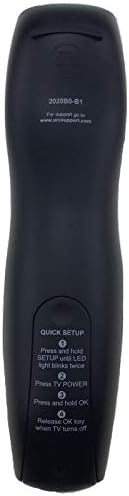
Image: Back of the remote control displaying quick setup instructions.
Note: If the TV does not turn off, repeat the steps or consult the TV's manual for specific remote programming codes if available.
Torolàlana miasa
The Calvas 2020B0-B1 remote control utilizes infrared (IR) technology. Ensure a clear line of sight between the remote's IR emitter and your TV's IR receiver for optimal performance.
Button Functions:
- HERY: Mandeha na mamono ny fahitalavitra.
- VOL +/-: Mampitombo na mampihena ny feo.
- CH +/-: Manova ny fantsona miakatra na midina.
- Mute: Mangina na manala ny feo amin'ny fahitalavitra.
- ISA PAD (0-9): Miditra mivantana ny laharan'ny fantsona.
- Tari-dalana: Mampiseho ny torolàlana fandaharana.
- MENU: Miditra amin'ny sakafo fototra amin'ny fahitalavitra.
- INFO: Mampiseho fampahalalana momba ny programa ankehitriny.
- Eny / Zana-tsipìka Fitetezana: Manamarina ny safidy ary mitety ireo menio.
- FIVOAHANA: Miala amin'ny sakafo na efijery ankehitriny.
- Farany: Hiverina any amin'ny teo viewfantsona ed.
- DAY +/-: Navigates through days in the program guide.
- MUSIC / FAV: Accesses music channels or favorite channels (functionality may vary by TV model).
fikarakarana
Fanadiovana:
- Fafao amin'ny lamba malefaka sy maina ny fanaraha-maso lavitra.
- Ho an'ny loto mafy loha dia kely dampen ilay lamba misy rano na mpanadio malefaka tsy mikosoka.
- Aza mampiasa akora simika mahery vaika, solvents, na lamba fanadiovana mikikisana, satria mety hanimba ny velaran'ny fanaraha-maso lavitra na ny singa anatiny izany.
Fanoloana bateria:
- Replace batteries when the remote's response becomes sluggish or the LED indicator fails to light up.
- Always replace both batteries at the same time with new AAA batteries.
- Aza afangaro ny batterie taloha sy vaovao, na karazana batterie samihafa.
- Esory ny batterie raha toa ka tsy ampiasaina mandritra ny fotoana maharitra ny remote mba hisorohana ny fivoahana.
fitahirizana:
- Tehirizo ao amin'ny toerana mangatsiatsiaka sy maina lavitry ny tara-masoandro mivantana sy ny maripana tafahoatra ny remote.
- Avoid dropping the remote or exposing it to excessive moisture.
Fanamboarana
- Remote tsy mamaly:
- Hamarino raha tafiditra tsara ny bateria ary tsy lany. Soloy raha ilaina.
- Ensure there is a clear line of sight between the remote and the TV's IR receiver. Remove any obstructions.
- Try re-pairing the remote with the TV using the "Quick Setup" steps.
- bokotra vitsivitsy ihany no miasa:
- This might indicate a partial pairing issue or a specific button malfunction. Try re-pairing the remote.
- Clean the remote's surface, especially around the unresponsive buttons, to ensure no debris is interfering.
- Saran'asa fohy:
- Soloy vaovao ny bateria.
- Ataovy azo antoka fa tsy misy loharanon-kazavana mahery vaika (toy ny tara-masoandro mivantana na jiro fluorescent mamiratra) manelingelina ny famantarana IR.
fepetra arahana
| Marika | pentina sola |
| Laharana modely | 2020B0-B1 (Mfr Part Number: CLS-D41D8CD98F00B204E9800998ECF8427E) |
| Fitaovana mifanentana | Television (Shaw LCD LED TVs) |
| Teknolojia fifandraisana | Infrarouge (IR) |
| Karazana Controller | Fanaraha-maso bokotra |
| Maximum Number of Supported Devices | 1 |
| Faritra faratampony | 10 metatra |
| Endri-javatra manokana | Famolavolana ergonomika |
Warranty Information
This product is typically covered by a limited warranty provided by the seller or manufacturer. Please refer to your purchase documentation or contact the retailer directly for specific warranty terms and conditions. Keep your proof of purchase for any warranty claims.
MANAMPY
For further assistance, technical support, or inquiries regarding your Calvas 2020B0-B1 remote control, please contact the seller or manufacturer through the platform where the product was purchased. Provide your model number (2020B0-B1) and any relevant purchase details when seeking support.