
Fampahalalana manan-danja momba ny fiarovana
Read all instructions carefully before using this product. Keep this manual for future reference.
- Fadio ny fampiharihariana ny headset amin'ny hafanana tafahoatra na ny hamandoana.
- Aza disassemble na manandrana manamboatra ny headset.
- Clean the headset with a soft, dry cloth. Do not use liquid cleaners.
- Ny fihainoana maharitra amin'ny haavo avo dia mety hiteraka fahasimbana amin'ny fihainoana.
Fonosana fonosana
Hamarino fa misy ny entana rehetra ao anaty fonosana:
- NUBWO HW02 USB Computer Headset
- USB Cable
- User Manual (ity antontan-taratasy ity)
Hametraka
Connecting to a Computer (USB)
- Mitadiava seranan-tsambo USB misy eo amin'ny solosainao.
- Plug the USB connector of the NUBWO HW02 headset into the USB port.
- Mazàna ny rafitra fiasana dia mametraka ho azy ireo mpamily ilaina. Mety haharitra fotoana fohy izany.
- Rehefa tafapetraka ny headset dia tokony ho fantatra ho fitaovana fampidirana sy famoahana feo.
- You may need to select the "NUBWO HW02" headset as your default audio device in your computer's sound settings.
Connecting to a Device (3.5mm Jack)
The NUBWO HW02 headset features a 3.5mm jack for broader compatibility.
- Locate the 3.5mm audio jack on your device (e.g., gaming console controller, smartphone, tablet).
- Insert the 3.5mm connector from the headset into the device's audio jack.
- Ataovy azo antoka fa azo antoka ny fifandraisana.
- Adjust audio settings on your device as needed to select the headset for input and output.
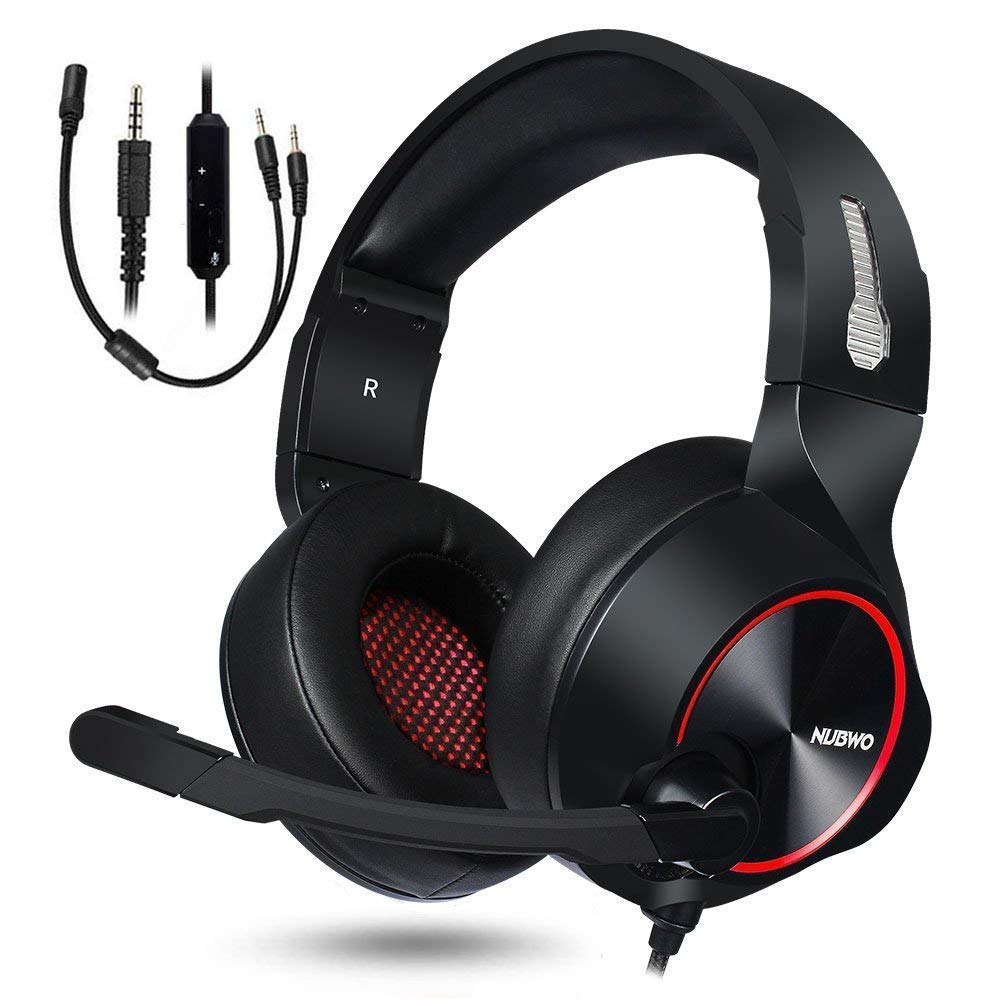
Image: NUBWO HW02 USB Computer Headset. This image displays the overall design of the headset, featuring orange accents on the earcups and headband, with a flexible microphone arm.
Torolàlana miasa
Fanitsiana ny headset
- Fanitsiana fehin-doha: Gently slide the earcups up or down along the headband to achieve a comfortable fit over your ears.
- Fametrahana mikrofona: Bend the flexible microphone arm to position the microphone approximately 1-2 inches from your mouth for optimal voice clarity.
Fanaraha-maso ny volume
The NUBWO HW02 headset features an in-line volume control.
- Ampitomboy ny volanao: Ahodino miakatra ny kodiarana fanamafisam-peo.
- Ahena ny volume: Ahodino midina ny kodiarana fanamafisam-peo.
Mikrofonina mangina
An in-line switch allows you to mute or unmute the microphone.
- Mangina mikrô: Slide the switch to the "Mute" position.
- Unmute Microphone: Slide the switch to the "Unmute" position.
fikarakarana
- Fanadiovana: Use a soft, dry, lint-free cloth to wipe down the earcups and headband. Do not use abrasive cleaners, alcohol, or solvents.
- fitahirizana: When not in use, store the headset in a clean, dry place away from direct sunlight and extreme temperatures.
- Cable Care: Avoid sharp bends or excessive pulling on the cable to prevent damage.
Fanamboarana
| OLANA | Antony mety hitranga | vahaolana |
|---|---|---|
| Tsy misy feo avy amin'ny headset | Tsy mifandray tsara ny écouteur. Ambany loatra ny volume. Diso ny fitaovana famoahana feo nofantenana. | Ensure USB or 3.5mm jack is fully inserted. Increase volume using in-line control and computer/device settings. Select "NUBWO HW02" as the default playback device in your sound settings. |
| Microphone tsy mandeha | Nampangina ny mikrô. Diso ny fitaovana fampidirana feo nofantenana. Diso toerana ny mikrô. | Check the in-line mute switch. Select "NUBWO HW02" as the default recording device in your sound settings. Amboary ny toerana misy ny mikrôfôna akaikin'ny vavanao. |
| Ratsy na simba ny kalitaon'ny feo | Haavo loatra ny volume. Fifandraisana malalaka. fitsabahana. | Ampidino ny feo. Re-seat the USB or 3.5mm connection. Andramo ampifandraisina amin'ny seranana na fitaovana USB hafa. |
fepetra arahana
- Modely: HW02
- Fifandraisana: Wired (USB, Jack 3.5mm)
- Fametrahana sofina: Over sofina
- Fanaraha-maso ny tabataba: Active Noise Cancellation
- Fifanarahana amin'ny sehatra: Gaming Console, PC
- Fitaovana: Silicone
- Lanja entana: 1.11 kg
- Haben'ny vokatra: 9 x 7 x 4 santimetatra
Warranty sy fanohanana
For warranty information or technical support, please refer to the NUBWO official webtranokala na mifandray amin'ny serivisy mpanjifany. Tehirizo ny tapakila fividiananao ho porofon'ny fividianana.
NUBWO Official Webtranokala: Visit the NUBWO Store on Amazon