
1. Fampidirana
This manual provides comprehensive instructions for the installation, operation, and maintenance of your Sricam SP007 WiFi Wireless 2MP 1080p Waterproof Outdoor Security Camera. Designed for outdoor surveillance, this camera offers high-definition video, motion detection, and night vision capabilities, allowing you to monitor your property remotely from various devices.

Figure 1.1: Sricam SP007 WiFi Wireless Outdoor Security Camera.
Ny endri-javatra fototra dia ahitana:
- 2MP 1080p HD Resolution: Manome horonan-tsary mazava sy feno fotage.
- Design tsy tantera-drano: Suitable for outdoor installation in various weather conditions.
- Fikarohana hetsika: Sends alerts upon detecting movement.
- IR Night Vision: Enables clear monitoring in low-light or dark environments.
- Fandraketana karatra SD: Supports local storage up to 128GB for continuous recording.
- Fidirana lavitra: View live video on PC/Laptop, Android, and iPhone devices.
2. Ny votoatin'ny fonosana
Azafady mba hamarino tsara fa eo daholo ny entana rehetra ary ao anatin'ny toe-javatra tsara rehefa avy manokatra ny fonosana:
- Sricam SP007 IP Camera
- Power Adapter
- Fametrahana screws
- User Manual (ity antontan-taratasy ity)
- WiFi Antenna
3. Vokatra singa
Familiarize yourself with the main components of your Sricam SP007 camera:
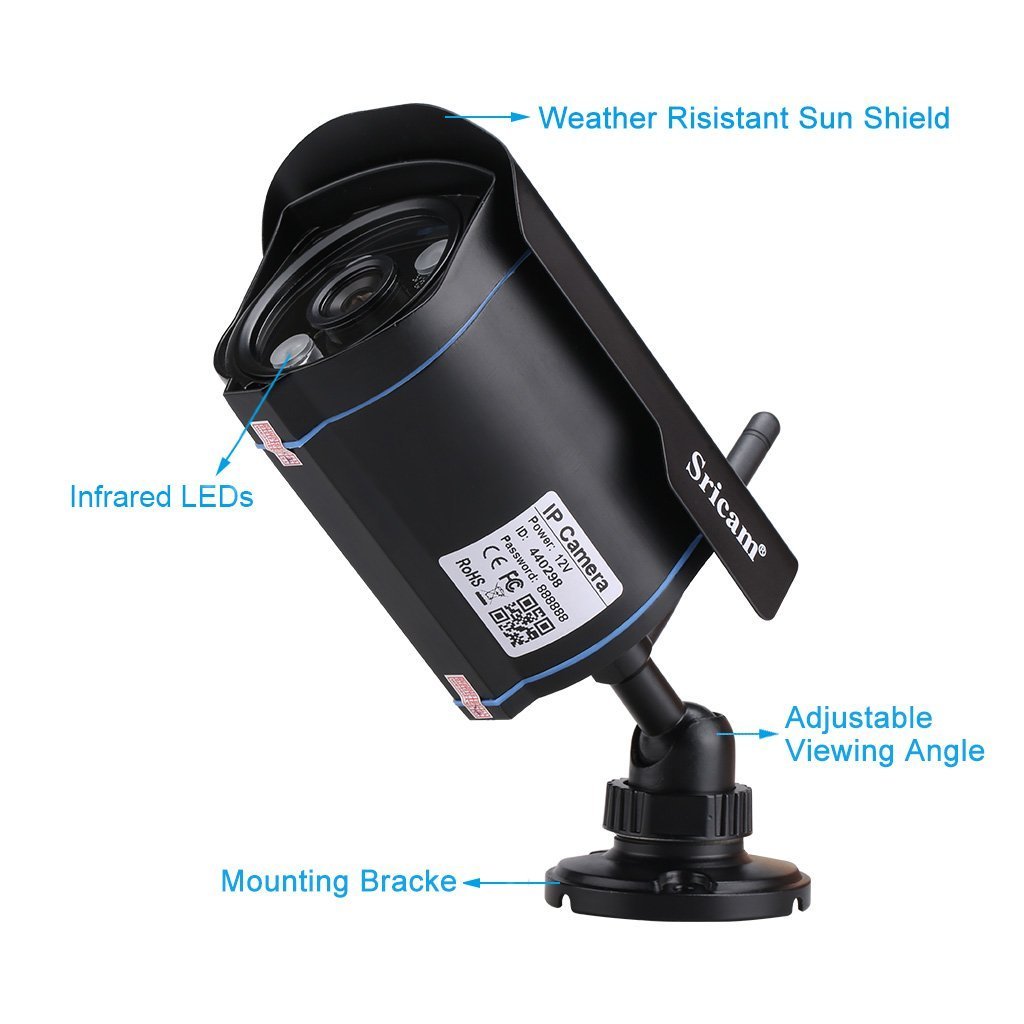
Figure 3.1: Labeled components of the Sricam SP007 camera.
- Weather Resistant Sun Shield: Protects the camera lens from direct sunlight and harsh weather.
- LED infrarouge: Omeo jiro mba hahafahana mahita amin'ny alina.
- Adjustable Viewangle: Allows for flexible positioning to achieve desired coverage.
- Fametahana Used for secure installation on walls or other surfaces.
- Antenna WiFi: For wireless network connectivity.
- Slot karatra SD: Located on the camera body, supports up to 128GB for video storage.

Figure 3.2: The Sricam SP007 camera is designed to be waterproof for outdoor use.
4. Torolàlana fananganana
Follow these steps to set up your Sricam SP007 camera:
- Fampifandraisana herinaratra: Connect the camera to the provided power adapter and plug it into an electrical outlet.
- Initial LAN Connection (Optional for WiFi Setup): For the initial setup and to save WiFi settings, connect the camera to your router using an Ethernet (LAN) cable. Once WiFi settings are saved, the LAN connection is no longer required.
- Install Sricam App: Download and install the 'SRICAM' application on your Android or iPhone device from the respective app store (Google Play Store or Apple App Store).
- Register kaonty: Open the SRICAM app, register with your email address, and create a new account.
- Ampio fakan-tsary: In the app, tap on the '+' icon to add a new camera. You can scan the QR code (barcode) located at the bottom of the camera for quick setup.
- Tefeo WiFi: Navigate to the WiFi settings within the app and select your home WiFi network. Enter the WiFi password to connect the camera wirelessly. Once connected, you can disconnect the LAN cable if used.
- Ampidiro ny karatra SD (tsy voatery): If you wish to record videos locally, insert a microSD card (up to 128GB, formatted to FAT32) into the designated slot on the camera.
5. Fampandehanana
Once your camera is set up, you can begin monitoring:
- Vidéo mivantana Viewing: Access live video feeds through the SRICAM app on your mobile device, or via PC software/web browser from anywhere with an internet connection.
- Fikarohana hetsika: The camera is equipped with motion detection. When motion is detected, the camera can send alarm notifications to your connected device.
- Fahitana alina: The built-in IR lens automatically activates in low-light conditions, providing clear black-and-white video footage amin'ny maizina.
- Fandraketana horonantsary: Videos can be recorded directly to the inserted SD card. The camera supports loop recording, automatically overwriting the oldest footage rehefa feno ny karatra.
6. Fikojakojana
To ensure optimal performance and longevity of your Sricam SP007 camera, consider the following maintenance tips:
- Lens madio: Regularly clean the camera lens with a soft, lint-free cloth to ensure clear image quality. Avoid abrasive cleaners.
- Jereo ny fifandraisana: Periodically inspect all cable connections (power, LAN if used) to ensure they are secure and free from damage.
- Fanavaozana ny mikirao praogramanao: Check the Sricam official website or app for any available firmware updates to improve performance and security.
- Antony ara-tontolo iainana: While waterproof, avoid submerging the camera in water. Ensure the mounting location provides adequate protection from extreme weather conditions if possible.
7. Famahana olana
If you encounter issues with your Sricam SP007 camera, refer to the following common problems and solutions:
- Camera Disconnects from WiFi: If the camera frequently disconnects, try power cycling the camera (unplug and plug back in). Ensure your WiFi signal is strong at the camera's location.
- SD Card Not Recording/Working: Ensure the SD card is formatted to FAT32 (32-bit cluster size) for stability. If issues persist, try a different SD card.
- App Monitor Screen Goes Blank: Raha ny live view screen becomes blank, exit the monitor view within the app and reopen it.
- Cannot Select WiFi in App During Setup: If you are unable to select your home WiFi, try using the camera's hotspot to add the camera to the app first, then change the network settings to your correct home WiFi.
- Difficulty with Initial Setup: For first-time users, setup can sometimes be challenging. Consider configuring the camera using an Apple phone or an older Android device if you experience issues with newer Android versions.
- Multiple Users Accessing Camera: A single Sricam account cannot handle multiple simultaneous users. To allow multiple family members to view the camera, create separate accounts for each device and link them to the same camera.
- Recorded Videos Not Showing Correctly: Ensure the camera time is synchronized or set approximately one minute behind your phone's time to correctly view horonan-tsary voatahiry.
8. Famaritana
| endri-javatra | famaritana |
|---|---|
| Marika | Sricam |
| Laharana modely | sp007Black |
| Teknolojia fifandraisana | Wireless (Wi-Fi) |
| Endri-javatra manokana | HD Resolution, Motion Sensor, Night Vision |
| Fampiasana anatiny / ivelany | ivelan'ny trano |
| Fitaovana mifanentana | Laptop, Android, iPhone |
| Loharanon-kery | Corded Electric |
| Karazana Controller | Android |
| Karazana fametrahana | Wall Mount |
| Ny refin'ny vokatra | 10 x 15 x 5 cm |
| Lanja entana | 650 g |
| Fampiasana soso-kevitra | Motion Detection |
9. Warranty sy fanohanana
Your Sricam SP007 camera comes with a Garantie 6 volana manomboka amin'ny datin'ny fividianana. Azafady, tehirizo ny porofon'ny fividiananao ho an'ny fitakiana fiantohana.
For technical support, troubleshooting assistance beyond this manual, or warranty inquiries, please refer to the contact information provided with your product packaging or visit the official Sricam support website.