
1. Fampidirana
Thank you for choosing the UNIC UC18 Mini Projector. This compact and portable projector is designed to provide a versatile viewing experience for home entertainment, presentations, and more. Featuring an LED lighting system, built-in speaker, and multiple input options, the UC18 offers convenience and functionality. Please read this manual thoroughly to ensure proper setup, operation, and maintenance of your device.
2. Information momba ny fiarovana
- Herin'aratra: Ampiasao fotsiny ny adaptatera herinaratra voalaza. Ataovy azo antoka fa ny voltagmifanaraka amin'ny fepetra takian'ny projecteur e.
- rivotra: Aza sakanana ny fisokafan'ny rivotra. Hamarino tsara ny toerana manodidina ny projector mba hisian'ny fikorianan'ny rivotra mba hisorohana ny hafanana be loatra.
- Hamandoana: Keep the projector away from water, rain, and excessive humidity. Do not operate with wet hands.
- Fanadiovana: Disconnect power before cleaning. Use a soft, dry cloth. Avoid liquid or aerosol cleaners.
- Fikarakarana: Handle the projector with care. Avoid dropping or subjecting it to strong impacts.
- Fiarovana maso: Aza mijery mivantana amin'ny family projector rehefa mandeha ny lamp is on, as the bright light can cause eye strain or damage.
- Famongorana: Aza manandrana manala na manamboatra ny projecteur samirery. Ampahafantaro ny mpiasa mahafeno fepetra ny fanamboarana rehetra.
3. Ny votoatin'ny fonosana
Azafady mba jereo ny ao anaty fonosana rehefa avy manokatra ny boaty ianao. Raha misy entana very na simba dia mifandraisa amin'ny mpivarotra.
- UNIC UC18 Mini Projector
- Cable herinaratra
- Cable AV 3-in-1
- Remote Control (requires lithium battery, not included)
- User Manual
4. Vokatra mihoatraview
Projector Layout
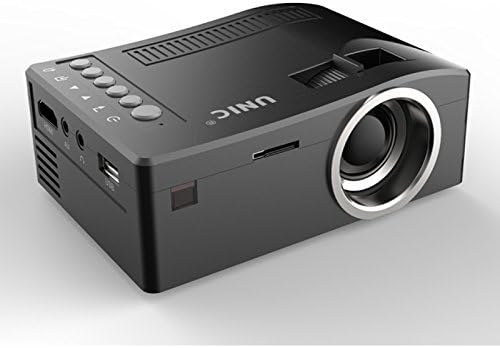
Eo anoloana sy ilany view of the UNIC UC18 Mini Projector, showing the lens, ventilation, and various ports.
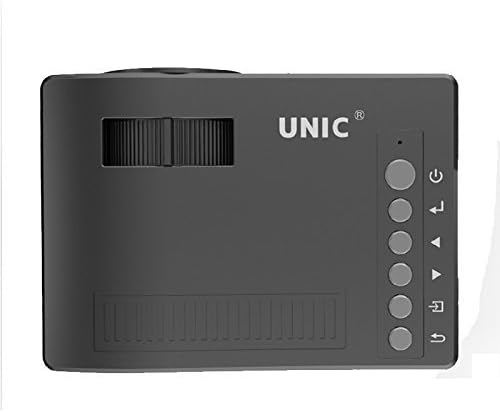
Top view of the UNIC UC18 Mini Projector, highlighting the control buttons and focus wheel.
Seranana sy Fanaraha-maso
The UNIC UC18 Mini Projector features a range of ports and controls for easy connectivity and operation:
- Lens: Mamolavola ny sary eo amin'ny efijery.
- Kodiarana fifantohana: Manual adjustment for image clarity.
- Bokotra hery: Mamelona na mamono ny projector.
- bokotra Menu: Miditra amin'ny menio firafitry ny projecteur.
- Bokotra Fikarohana (Ambony/Midina/Ankavia/Ankavanana): Ampiasaina hivezivezena amin'ny menio sy hanitsiana ny fikirana.
- Bokotra OK: Manamarina ireo safidy ao amin'ny menio.
- Bokotra loharano: Selects the input source (HDMI, USB, AV, TF).
- Port USB: Mampifandray fitaovana fitahirizana USB ho an'ny fandefasana media.
- Seranana HDMI: Connects to HDMI-enabled devices like laptops, gaming consoles, or media players.
- Port AV: Connects to devices using the included 3-in-1 AV cable.
- TF Card TF: Inserts a TF (Micro SD) card for media playback.
- Jack headphone 3.5mm: Connects external headphones or speakers.
- Mpandray IR: Mandray famantarana avy amin'ny fanaraha-maso lavitra.
5. Fametrahana
5.1 Fampifandraisana herinaratra
- Ampifandraiso amin'ny seranana fidirana herinaratra an'ny projecteur ny tariby herinaratra.
- Ampidiro amin'ny fivoahana mety tsara ny faran'ny tariby hafa.
- Hirehitra ny jiro famantarana ny herinaratra eo amin'ny projecteur.
5.2 Fampifandraisana ireo fitaovana fampidirana
- HDMI: Connect an HDMI cable from your source device (e.g., laptop, DVD player) to the projector's HDMI port.
- USB: Ampidiro ao amin'ny seranana USB ny kapila flash USB.
- NY: Use the provided 3-in-1 AV cable to connect to devices with AV output. Match the yellow, white, and red connectors.
- Karatra TF: Insert a TF (Micro SD) card into the TF card slot.
5.3 Positioning the Projector
Place the projector on a stable, flat surface. For optimal image quality, position the projector perpendicular to the projection surface (wall or screen). The throw distance can range from 0.48 to 2.43 meters, producing a picture size from 12 to 66 inches.
6. Torolàlana miasa
6.1 Mamelona/Mamono
Press the Power button on the projector or the remote control to turn the device on or off.
6.2 Fanitsiana fifantohana
After powering on, if the image appears blurry, rotate the manual focus wheel located near the lens until the image becomes clear and sharp.

Close-up of the manual focus wheel on the UNIC UC18 Mini Projector, located near the lens.
6.3 Fifantenana ny Loharano Fidirana
Press the 'Source' button on the projector or remote control. Use the navigation buttons to select your desired input source (HDMI, USB, AV, TF) and press 'OK' to confirm.
6.4 Fikarohana Menu
Press the 'Menu' button to access the projector's settings. Use the navigation buttons to browse options and 'OK' to select. Press 'Menu' again to exit.
6.5 Output Audio
The projector has a built-in speaker. For private listening or connecting to external audio systems, plug headphones or external speakers into the 3.5mm headphone jack.
7. Fikojakojana
7.1 Fanadiovana ny Lens
Use a soft, lint-free cloth specifically designed for optical lenses. Gently wipe the lens to remove dust or smudges. Avoid using abrasive materials or harsh chemicals.
7.2 Fanadiovana ny vatan'ny projecteur
Wipe the exterior of the projector with a soft, dry cloth. Do not use liquid cleaners or solvents.
7.3 Fitehirizana
Rehefa tsy ampiasaina mandritra ny fotoana maharitra, tehirizo ao amin'ny toerana mangatsiaka sy maina ny projecteur, lavitry ny tara-masoandro mivantana sy ny mari-pana tafahoatra. Sarony ny family mba hiarovana azy amin'ny vovoka.
8. Famahana olana
| OLANA | Antony mety hitranga | vahaolana |
|---|---|---|
| Tsy misy sary naseho | Power not connected; Incorrect input source; Loose cable connection | Check power cable; Select correct input source; Reconnect cables securely |
| Manjavozavo ny sary | Focus not adjusted; Projector too close/far | Adjust the focus wheel; Reposition the projector within recommended throw distance |
| Tsy misy feo | Volume too low; Muted; Audio cable not connected; Source device audio issue | Increase volume; Unmute; Check audio cable connection; Verify audio output on source device |
| Tsy mandeha ny fanaraha-maso lavitra | Batteries low/incorrectly inserted; Obstruction between remote and projector | Replace batteries (lithium battery required); Ensure clear line of sight to IR receiver |
| Mihoatra ny hafanana ny projector | Blocked ventilation; Prolonged use in hot environment | Ensure ventilation openings are clear; Operate in a well-ventilated area; Allow to cool down |
9. Famaritana
Famaritana ara-teknika
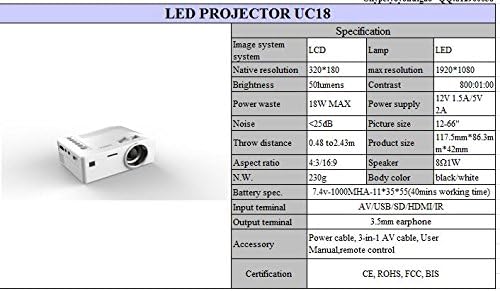
Detailed technical specifications for the UNIC UC18 Mini Projector, including resolution, contrast, and dimensions.
| endri-javatra | famaritana |
|---|---|
| Marika | UNIC |
| Anarana modely | UC18 |
| Display Technology | QVGA (LCD) |
| Native Resolution | 320 x 240 teboka |
| Fanapahan-kevitra tohanana ambony indrindra | 1920 x 1080 pixels (1080P) |
| ny famirapiratry ny mazava | 50 Lumens |
| Contrast Ratio | 500:1 |
| Aspect ratio | 16:9 (also supports 4:3) |
| Distance Throw | 0.48m - 2.43m (1.57ft - 7.97ft) |
| Haben'ny sary | 12-66 santimetatra |
| Terminal Terminal | AV, USB, SD (TF), HDMI, IR |
| Output Terminal | 3.5mm Earphone Jack |
| Endri-javatra manokana | Mpampiteny ao anatiny, portable |
| Fanjifana herinaratra | 24 Watts (Max 18W) |
| Herin'aratra | 12V 1.5A / 5V 2A |
| Ambaratonga tabataba | <25dB |
| Haben'ny vokatra (L x W x H) | 117.5mm x 86.3mm x 42mm |
| Lanja afa-karatsaka | 230g |
| Karazana fametrahana | Wall Mount |
| Fanaraha-maso lavitra | Yes (battery not included) |
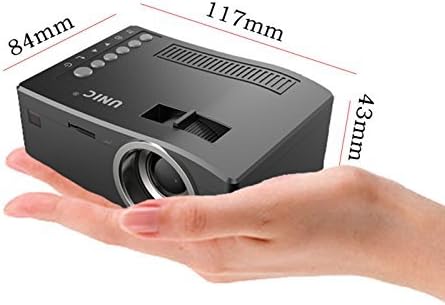
The UNIC UC18 Mini Projector held in a hand, illustrating its compact size and dimensions (117mm x 84mm x 43mm).
10. Warranty sy fanohanana
Raha mila fanazavana momba ny antoka na fanohanana ara-teknika, azafady mba jereo ireo antontan-taratasy nomena tamin'ny fotoana nividianana na mifandraisa amin'ny mpivarotra anao. Tazomy ny porofon'ny fividiananao ho an'ny fangatahana antoka rehetra.