
1. Vokatra mihoatraview
The Excelvan Wireless Weather Station (Model AOK-5061A) is designed to provide accurate indoor and outdoor temperature and humidity readings, along with weather forecasts and an alarm clock function. It features a large, colorful LCD display with LED backlight for easy readability.
Lafin-javatra fototra:
- Indoor/Outdoor Temperature and Humidity Measurement
- Weather Forecast with 5 Icons (Sunny, Partially Sunny, Cloudy, Rain, Heavy Rain)
- DCF Radio-Controlled Clock with Manual Setting
- Alarm with Snooze Function
- Large Color LCD Display with LED Backlight
- DST (Daylight Saving Time) Automatic Update
- Wireless Outdoor Sensor with up to 50m range

Sary 1: Eo anoloana view of the Excelvan Wireless Weather Station main unit, displaying weather forecast, outdoor/indoor temperature and humidity, and time.
2. Torolàlana fananganana
2.1 Ny votoatin'ny fonosana
Before proceeding with the setup, ensure all items are present in the package:
- 1 x Toeram-piantsonan'ny toetr'andro Main Unit
- 1 x Wireless Remote Sensor
- 1 x AC Power Adapter
- 1 x User Manual

Figure 2: The complete package contents, including the main weather station unit, wireless remote sensor, power adapter, and user manual.
2.2 Famelomana ny singa fototra
- Battery Installation (Optional): Open the battery compartment on the back of the main unit. Insert 3 x 1.5V AA batteries (not included), ensuring correct polarity. The LED backlight will stay on for 5 minutes when powered by batteries.
- AC Power Adapter (Recommended): For continuous backlight, connect the provided AC power adapter (4.5V, 150mA) to the main unit's power input and then plug it into a wall outlet.

Sary 3: aoriana view of the main unit showing the battery compartment with the cover removed, ready for battery insertion.

Sary 4: aoriana view of the main unit with the AC power adapter connected, illustrating the power input port.
2.3 Powering the Wireless Remote Sensor
- Open the battery compartment of the wireless remote sensor.
- Ampidiro bateria AAA 2 x 1.5V (tsy tafiditra), ary ataovy izay hahazoana antoka fa marina ny polarity-ny.
- Akatona tsara ny efitranon'ny bateria.

Figure 5: The wireless remote sensor, showing its display and the battery compartment on the back.
2.4 Fametrahana sensor
- The main unit is intended for indoor use only.
- Place the wireless remote sensor outdoors in a sheltered area, away from direct sunlight and rain, to ensure accurate readings.
- Ensure the sensor is within 50 meters (open space) of the main unit for optimal signal reception.
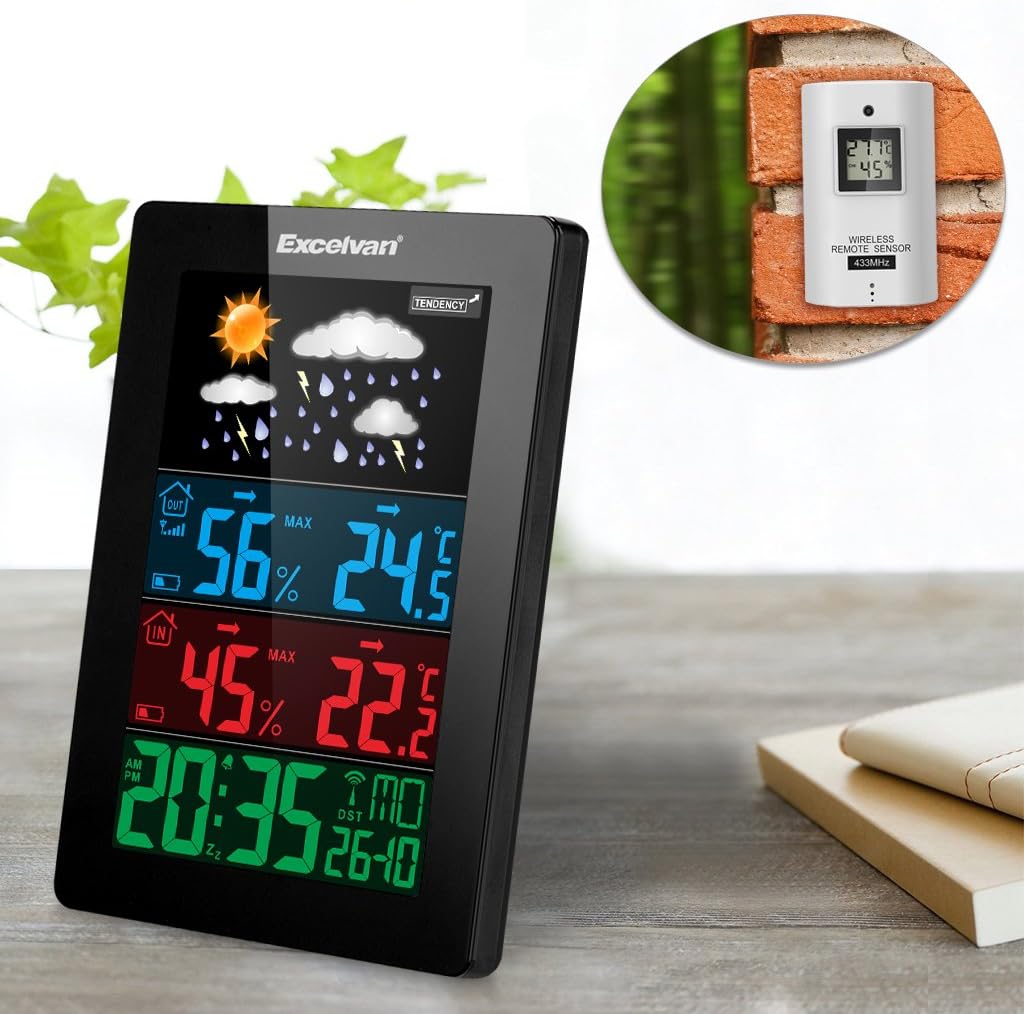
Figure 6: An illustration showing the main weather station unit indoors and the wireless remote sensor mounted on an outdoor wall.

Figure 7: A diagram highlighting the effective wireless transmission distance of 50 meters between the main unit and the remote sensor.
3. Torolàlana miasa
3.1 Fandrindrana voalohany
After powering both units, the main unit will automatically attempt to synchronize with the remote sensor and receive the DCF radio-controlled time signal. This process may take a few minutes.
3.2 Asehoyview
Ny efijery LCD lehibe dia mampiseho fampahalalana isan-karazany:
- Fizarana ambony: Weather forecast icons (sunny, cloudy, rainy, etc.) and weather tendency indicator.
- Middle-Top Section (Blue): Outdoor humidity and temperature.
- Middle-Bottom Section (Red): Indoor humidity and temperature.
- Bottom Section (Green): Current time (12/24 hour format), day of the week, and date.
Figure 8: Close-up of the main unit's display, illustrating the different data sections for weather, outdoor/indoor conditions, and time.
3.3 Setting Time and Date Manually
While the unit is radio-controlled, manual adjustments can be made:
- Tsindrio ny MODE button to cycle through display modes.
- Tazony ny MODE button for a few seconds to enter time setting mode.
- Ampiasao ny + SY - bokotra hanitsy ny soatoavina.
- mpanao gazety MODE again to confirm and move to the next setting (e.g., hour, minute, year, month, day, language for day of week).
3.4 Fampiasa fanairana sy Fampitandremana
- Tsindrio ny fanairana bokotra to view or set the alarm time.
- Tazony ny fanairana bokotra hidirana amin'ny fomba fametrahana fanairana. Ampiasao + SY - manitsy.
- Mba hampavitrika/famonoana ny fanairana, tsindrio ny fanairana tsindrio vetivety ny bokotra. Hiseho/hanjavona eo amin'ny efijery ny kisary fanairana.
- Rehefa maneno ny fanairana dia tendreo ny SNOOZE / MAZAVA button on top of the unit to activate the snooze function. The alarm will sound again after a few minutes.
- To stop the alarm completely, press any other button.

Figure 9: Top edge of the main unit, highlighting the "SNOOZE/LIGHT" touch-sensitive button for alarm snooze and backlight activation.
3.5 Fifantenana ny mari-pana
Tsindrio ny - button to switch between Celsius (°C) and Fahrenheit (°F) temperature units.
3.6 Faminanian'ny toetr'andro
The weather station predicts weather conditions based on atmospheric pressure changes. The icons (sunny, partially sunny, cloudy, rain, heavy rain) indicate the forecast for the next 12-24 hours, not the current weather.
4. Fikojakojana
- Fanadiovana: Fafao amin'ny lamba malefaka ny fitaovana fototra sy ny sensoramp lamba. Aza mampiasa mpanadio abrasive na solvents.
- Fanoloana bateria: Replace batteries in both the main unit and the remote sensor when the low battery indicator appears on the display. Ensure correct polarity.
- Fametrahana sensor: Periodically check the outdoor sensor's placement to ensure it remains sheltered and within range.
- fitahirizana: Raha tehirizina mandritra ny fotoana maharitra ny fitaovana dia esory ny bateria rehetra mba hisorohana ny fivoahan'ny rano.
5. Famahana olana
| OLANA | Antony mety hitranga | vahaolana |
|---|---|---|
| Tsy misy fandrefesana ny mari-pana/hamandoana any ivelany. |
|
|
| Fampisehoana ora diso. |
|
|
| Manjavozavo na banga ny fampisehoana. |
|
|
6. Famaritana
| endri-javatra | antsipirihany |
|---|---|
| Radio Voafehy Clock | Sary DCF77 |
| Halavan'ny mari-pana ao anaty | 0 °C hatramin'ny +50 °C (32 °F hatramin'ny 122 °F) |
| Ny mari-pana any ivelany | -20 °C hatramin'ny +60 °C (-4 °F hatramin'ny 140 °F) |
| Fahamarinana fandrefesana ny maripana | ±2 °C |
| Hamandoana anatiny / ivelany | 20-90 % RH |
| Fanapahan'ny hamandoana | 1 % |
| Fatran'ny sensor tsy misy tariby | 433 MHz |
| Famantarana Wireless | Hatramin'ny 50 metatra (efa misokatra) |
| Probe Cable Length (for external probe, if applicable) | 1 m |
| Waterproof Level of Sensor | IPX3 |
| Main Station Power | 3 x 1.5V AA batteries (not included) or 4.5V, 150mA AC adapter (included) |
| Remote Sensor Power | 2 x 1.5V AAA bateria (tsy tafiditra) |
| Main Station Dimensions | 148 × 110 × 30 mm |
| Main Station Weight (without batteries) | 242 g |
| Remote Sensor Dimensions | 60 × 100 × 20 mm |
| Remote Sensor Weight (without batteries) | 50 g |
| Day of Week Languages | German, English, Italian, French, Dutch, Spanish, Danish |
7. Warranty sy fanohanana
For warranty information or technical support, please refer to the documentation provided with your purchase or contact Excelvan customer service through their official webtranokala na mpivarotra anao.
Fanamarihana: Ity boky torolalana ity dia natao ho fampahafantarana fotsiny ihany. Mety hiova tsy misy fampandrenesana mialoha ny fepetra takiana.