
Nokia 220 DUAL
Nokia 220 2G Boky Torolàlana momba ny fampiasana finday tsy voahidy
Model: 220 DUAL | Model Number: 7740A001AH
1. Fampidirana
This user manual provides essential information for the safe and efficient operation of your Nokia 220 2G Unlocked Mobile Phone. Please read this manual carefully before using your device to ensure proper functionality and to avoid damage. Keep this manual for future reference.
2. Vokatra mihoatraview
The Nokia 220 is a compact and reliable 2G mobile phone designed for essential communication. It features a 2.4-inch display, a 2-megapixel camera, and Dual SIM capability, allowing you to manage two phone numbers simultaneously. Its robust design and long-lasting battery make it ideal for everyday use.
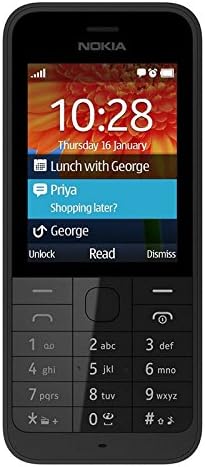
Sary 2.1: anoloana view of the Nokia 220 mobile phone. This image displays the phone's 2.4-inch screen, which shows the current time and date, along with notification icons. Below the screen is the physical alphanumeric keypad and central navigation buttons, typical of a feature phone.
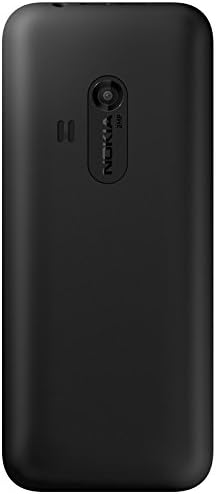
Sary 2.2: indray view of the Nokia 220 mobile phone. This image highlights the rear of the device, featuring the integrated 2-megapixel camera lens positioned centrally near the top. The Nokia brand logo is visible below the camera module, and the phone has a matte black finish.
3. Fametrahana
3.1. Inserting the SIM Card(s) and Battery
- Esory ny fonony aoriana: Gently pry open the back cover of the phone using the notch usually located at the bottom or side.
- Ampidiro ny karatra SIM: Locate the SIM card slots. For Dual SIM models, there will be two slots. Insert your standard or micro SIM card(s) into the designated slots with the gold contacts facing down, ensuring they click into place.
- Insert the microSD card (optional): If you wish to expand storage, insert a microSD card (up to 32 GB) into its dedicated slot.
- Ampidiro ny bateria: Align the battery contacts with the phone's contacts and gently press the battery into its compartment.
- Soloy ny fonony aoriana: Align the back cover and press it firmly until it snaps into place around all edges.
3.2. Fametrahana ny bateria
Before first use, fully charge the battery. Connect the micro USB charger cable to the phone's charging port and plug the other end into a power outlet. The battery indicator on the screen will show charging progress. A full charge typically takes a few hours.
3.3. Mamelona/Mamono
- Hamelona: Press and hold the Power/End Call button until the phone vibrates and the screen lights up.
- Mamoaka: Press and hold the Power/End Call button until the power-off options appear on the screen, then select "Power off" or "Shut down".
4. Torolàlana miasa
4.1. Fikarohana fototra
- Fanalahidin'ny Fikarohana: Use the central navigation key (up, down, left, right) to scroll through menus and options.
- bokotra Select/OK: The center button of the navigation key is used to confirm selections.
- Fanalahidy malefaka: The two keys directly below the screen (left and right) are context-sensitive. Their function is displayed on the screen directly above them.
- Back/Clear Key: Used to go back to the previous screen or delete characters.
4.2. Fanaovana sy fandraisana antso
- Raha hiantso: Ampidiro amin'ny alalan'ny fitendry ny laharan-telefaona ary tsindrio ny bokotra Green Call.
- Raha hamaly antso: Tsindrio ny bokotra maitso Antso rehefa maneno ny telefaona.
- Hamaranana antso: Tsindrio ny bokotra Mena Faranana ny Antso.
4.3. Fandefasana sy Fandraisana Hafatra
- Raha handefa SMS: Go to Menu > Messaging > Create message. Type your message, enter the recipient's number, and select "Send".
- To read a message: New messages will typically appear as a notification. You can also go to Menu > Messaging > Inbox to view naharay hafatra.
4.4. Fampiasana fakan-tsary
The Nokia 220 features a 2-megapixel camera.
- To open the camera: Mandehana any amin'ny Menu > Camera.
- Raha haka sary: Frame your shot and press the central navigation key or the designated soft key to capture the image.
- ny view sary: Go to Menu > Gallery or Menu > Photos.
5. Fikojakojana
- Fanadiovana: Mampiasà lamba malefaka sy maina hanadiovana ny efijerin'ny finday sy ny vatany. Aza mampiasa ranoka fanadiovana na fitaovana manimba.
- Fikarakarana bateria:
- Aza apetraka amin'ny hafanana tafahoatra ny bateria.
- Fadio ny fanalana tanteraka ny bateria matetika.
- Use only original or approved chargers.
- fitahirizana: Tehirizo ao amin'ny toerana mangatsiaka sy maina ny finday rehefa tsy ampiasaina mandritra ny fotoana maharitra.
- Fanavaozana rindrambaiko: While specific software updates are not guaranteed, ensure your phone's software is up-to-date if prompted, to maintain optimal performance and security.
6. Famahana olana
| OLANA | Antony mety hitranga | vahaolana |
|---|---|---|
| Tsy mandeha ny telefaona. | Battery is drained or not properly inserted. | Fenoy ny bateria. Hamarino tsara fa tafiditra tsara ny bateria. |
| Tsy afaka manao na mandray antso. | No network signal, SIM card not inserted correctly, or SIM card issue. | Check network signal strength. Reinsert SIM card(s). Contact your service provider. |
| Mivaingana na tsy mamaly ny efijery. | Fahadisoana rindrambaiko vonjimaika. | Esory ary ampidiro indray ny bateria mba hanaovana famerenana mafy. |
| Poor camera image quality. | Maloto ny lens na ratsy ny toe-pahazavana. | Clean the camera lens with a soft cloth. Ensure adequate lighting. |
7. Famaritana
| endri-javatra | antsipirihany |
|---|---|
| Marika | Nokia (Manufactured by Microsoft) |
| Anarana modely | 220 DUAL |
| Laharana modely | 7740A001AH |
| Haben'ny fampisehoana | 2.4 santimetatra |
| Asehoy ny fanapahan-kevitra | 320 x 240 teboka |
| Teknolojia finday | 2G |
| Karazana SIM | Dual SIM |
| Fakan-tsary | 2 megapixels |
| Fahatsiarovana anatiny | 1 MB (for OS and basic functions) |
| Fitehirizana azo itarina | Up to 32 GB via MicroSD (TransFlash) |
| fifandraisana | Bluetooth, Micro USB |
| Karazana bateria | Lithium-ion |
| loko | Mainty |
8. Warranty sy fanohanana
- Fanomezana antoka: Ity vokatra ity dia misy garantie 2 taona avy amin'ny mpanamboatra. Tazomy azafady ny porofon'ny fividiananao mba hahazoana antoka fa tsy misy olana.
- Misy kojakoja ilaina: Information regarding the availability of spare parts for this device is currently unavailable.
- Fanavaozana rindrambaiko: Information regarding guaranteed software updates for this device is not available.
- Fanohanana ny mpanjifa: For further assistance or technical support, please refer to the official Nokia support webtranokala na mifandraisa amin'ny mpivarotra anao.