
Sava lalana
Misaotra anao nividyasing the RCA 32LB45RQ 32-Inch Full 1080p 60Hz LCD HDTV. This manual provides essential information for the safe and efficient operation of your television. Please read it thoroughly before using the product and retain it for future reference.
Information momba ny fiarovana
Tandremo ireto fepetra fiarovana manaraka ireto mba hisorohana ny fahasimbana sy hiantohana ny fiasana azo antoka:
- Loharano herinaratra: Ampifandraiso amin'ny famatsiana herinaratra voalaza ihany ny fahitalavitra.
- rivotra: Ataovy azo antoka tsara ny rivotra manodidina ny fahitalavitra. Aza sakanana ny fisokafan'ny rivotra.
- Rano: Keep the TV away from water and moisture. Do not place liquid-filled objects on the TV.
- Fanadiovana: Esory ny TV alohan'ny hanadiovana. Mampiasà lamba malefaka sy maina. Halaviro ny mpanadio ranon-javatra.
- Fametrahana: Apetraho eo amin'ny toerana ambony miorim-paka ny fahitalavitra na apetaho tsara amin'ny rindrina.
- Serivisy: Aza manandrana manamboatra ny fahitalavitra samirery. Ampahafantaro ny mpiasa mahafeno fepetra ny asa rehetra.
Inona no ao anaty boaty
Hamarino fa misy ny singa rehetra:
- RCA 32LB45RQ 32-Inch LCD HDTV
- Mitsangàna
- Fanaraha-maso lavitra
- 2 bateria AA
- Tady herinaratra
- User Manual (ity antontan-taratasy ity)
Hametraka
Fametrahana ny Stand
To attach the included stand, carefully place the TV screen-down on a soft, clean surface to prevent scratches. Align the stand with the mounting holes on the bottom of the TV and secure it using the provided screws. Ensure the stand is firmly attached before placing the TV upright.

anoloana view of the RCA 32LB45RQ HDTV with its stand attached.
Fametrahana rindrina
The RCA 32LB45RQ is wall mountable. A VESA-compatible wall mount kit (sold separately) is required. Refer to the wall mount kit's instructions for proper installation. Ensure the wall can support the weight of the TV and the mount.
Fampifandraisana Periferika
Your TV offers various input ports for connecting external devices:
- HDMI: Connect Blu-ray players, game consoles, cable/satellite boxes, and other HD devices. The TV has 3 HDMI ports.
- USB: Connect USB storage devices for media playback. The TV has 1 USB port.
- Ampahany (YPbPr): Connect older video devices using component video and stereo audio cables. The TV has 1 component input.
- VGA: Connect a computer. The TV has 1 VGA input.
- Antenna/Cable: Ampifandraiso amin'ny antenne ho an'ny fampielezam-peo an-habakabaka na fifandraisana amin'ny fahitalavitra cable.

aoriana view of the RCA 32LB45RQ HDTV, highlighting the various input ports for external devices.
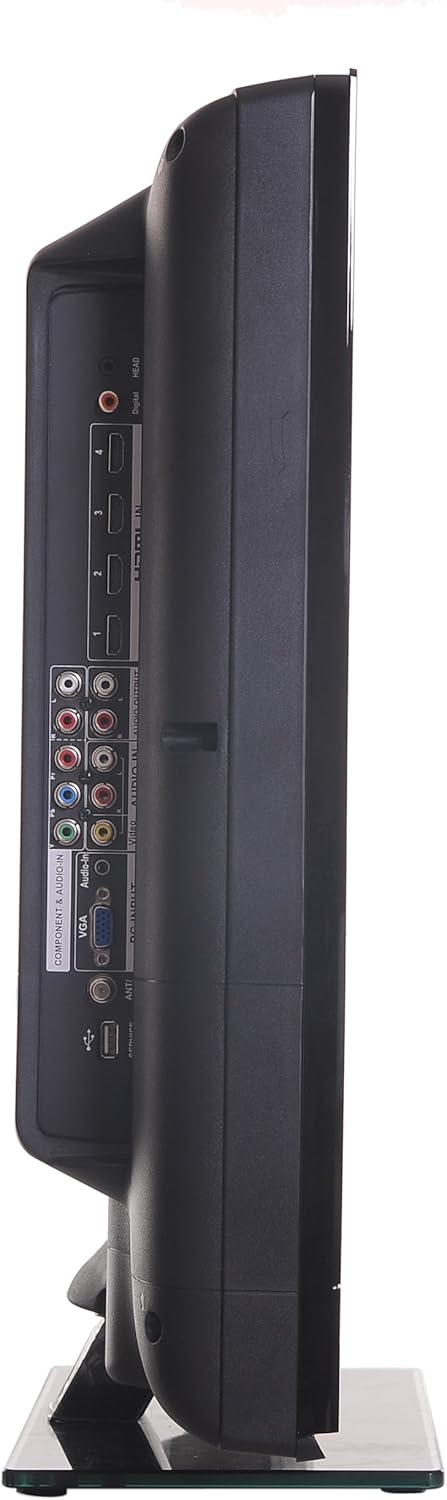
sisiny view of the RCA 32LB45RQ HDTV, showing additional input ports for convenient access.
Famelomana sy fametrahana voalohany
After connecting all desired devices and the power cord, press the power button on the TV or remote control. Follow the on-screen prompts for initial setup, including language selection, time zone, and channel scanning for over-the-air or cable channels.
fandidiana
Fanaraha-maso lavitraview
The included remote control allows you to access all TV functions. Insert the two AA batteries (included) into the remote control, observing polarity.
Asa fototra
- Hery: Tsindrio raha hamono na hamono ny fahitalavitra.
- Vola miakatra/midina: Ahitsio ny haavon'ny feo.
- Fantsona ambony/midina: Ovay ny fantsona fahitalavitra.
- Mangina: Silence the TV audio.
- Fampidirana: Cycle through available input sources (HDMI 1, HDMI 2, Component, VGA, TV).
Menu Navigation
Press the 'Menu' button on your remote to access the TV's settings. Use the arrow keys to navigate and 'OK' or 'Enter' to select options.
- Fikirana sary: Adjust brightness, contrast, color, tint, sharpness, and select picture modes (e.g., Standard, Dynamic, Movie).
- Fikirana feo: Adjust bass, treble, balance, and select sound modes (e.g., Standard, Music, Movie).
- Settings/Setup: Access general TV settings such as language, time, parental controls (V-Chip), and software updates.
Serivisy Aterineto
The TV supports a built-in browser for basic internet access. Use the remote control to navigate web pejy.
fikarakarana
Manadio ny efijery
Fafao moramora amin'ny lamba malefaka tsy misy loko ny efijery. Ho an'ny marika mafy loha, kely dampen the cloth with water or a specialized screen cleaner (ensure it is safe for LCD screens) and wipe gently. Do not spray liquid directly onto the screen.
Fikarakarana ankapobeny
- Aza avela ho tratran'ny tara-masoandro mivantana na amin'ny mari-pana tafahoatra ny fahitalavitra.
- Aza mametraka zavatra mavesatra eo ambonin'ny fahitalavitra.
- Esory ny televiziona mandritra ny oram-baratra na rehefa tsy ampiasaina mandritra ny fotoana maharitra.
Fanamboarana
If you encounter issues with your TV, refer to the following table for common problems and solutions:
| OLANA | Antony mety / Vahaolana |
|---|---|
| Tsy misy hery | Ensure the power cord is securely plugged into the TV and a working electrical outlet. Check the power indicator light. |
| Tsy misy sary, fa misy feo | Check the input source selection. Ensure the connected device is powered on and sending a signal. |
| Tsy misy feo fa misy sary | Jereo ny haavon'ny feo ary ataovy azo antoka fa tsy mangina ny fahitalavitra. Hamarino ny fifandraisana amin'ny tariby audio ho an'ny fitaovana ivelany. |
| Kalitaon'ny sary ratsy | Adjust picture settings (brightness, contrast, sharpness). Check antenna or cable connections. Ensure the input source is providing a high-quality signal. |
| Tsy mandeha ny fanaraha-maso lavitra | Jereo ary soloy ny bateria. Ataovy azo antoka fa tsy misy sakana eo anelanelan'ny fanaraha-maso lavitra sy ny sensor IR an'ny fahitalavitra. |
fepetra arahana
Detailed technical specifications for the RCA 32LB45RQ HDTV:
| endri-javatra | famaritana |
|---|---|
| Anarana modely | 32LB45RQ |
| Haben'ny efijery | 32 santimetatra |
| Display Technology | LCD |
| vahaolana | 1080p (1920 x 1080) |
| Ny tahan'ny fanavaozana | 60Hz |
| Aspect ratio | 16:9 |
| Contrast Ratio | 5000:1 |
| Fotoam-pamaliana | 8 Miliseconds |
| Karazana Tuner | ATSC, NTSC |
| Total seranan-tsambo HDMI | 3 |
| Total seranan-tsambo USB | 1 |
| Component Inputs | 1 |
| Vidin'ny VGA | 1 |
| Teknolojia fifandraisana | HDMI, USB |
| Tohanana Aterineto | mpitety |
| Karazana fametrahana | Wall Mount |
| loko | Mainty |
| Lanja entana | 17.4 kilao |
| Anisan'ny singa | Mijoroa, TV |
| Parental Control Technology | V-Chip |
| Taona modely | 2017 |

Energy Guide label for the RCA 32LB45RQ HDTV, showing estimated yearly energy cost.
Warranty sy fanohanana
Warranty Information
This RCA 32LB45RQ HDTV comes with a Limited 1 year parts and labor warranty. Please retain your proof of purchase for warranty claims. For specific terms and conditions, refer to the warranty card included with your product or contact RCA customer support.
Fanohanana ny mpanjifa
For technical assistance, troubleshooting beyond this manual, or warranty service, please contact RCA customer support. Contact information can typically be found on the RCA official webtoerana na eo amin'ny fonosana vokatra.