
1. Fampidirana
The SteelSeries Kana Optical Gaming Mouse is engineered for precision and versatility, designed to accommodate all three primary grip styles: palm, claw, and fingertip. This ambidextrous mouse features an ergonomic button layout and size, developed in collaboration with professional gaming teams to ensure consistent performance and accuracy in competitive environments. This manual provides comprehensive instructions for setup, operation, maintenance, and troubleshooting to help you maximize your gaming experience.
2. Ny votoatin'ny fonosana
- SteelSeries Kana Optical Gaming Mouse (White)
- Quick Start Guide (integrated into this manual)
3. Vokatra mihoatraview
Familiarize yourself with the key components of your SteelSeries Kana mouse:
- Bokotra Tsindrio havia: Bokotra hetsika voalohany.
- bokotra havanana: Bokotra hetsika faharoa.
- Kodiaran'ny horonam-boky: For scrolling and a clickable middle button. The scroll wheel is illuminated.
- CPI Toggle Button: Located centrally, allows quick switching between sensitivity settings.
- Bokotra eo anilany (x2): One on each side, large and easily accessible for rapid-fire actions. These can be customized or disabled via software.
- Optical Sensor: Located on the underside, provides precise tracking.
- USB Connector: For connecting the mouse to your computer.
- Tariby voarandrana: Durable, tangle-free nylon cord.
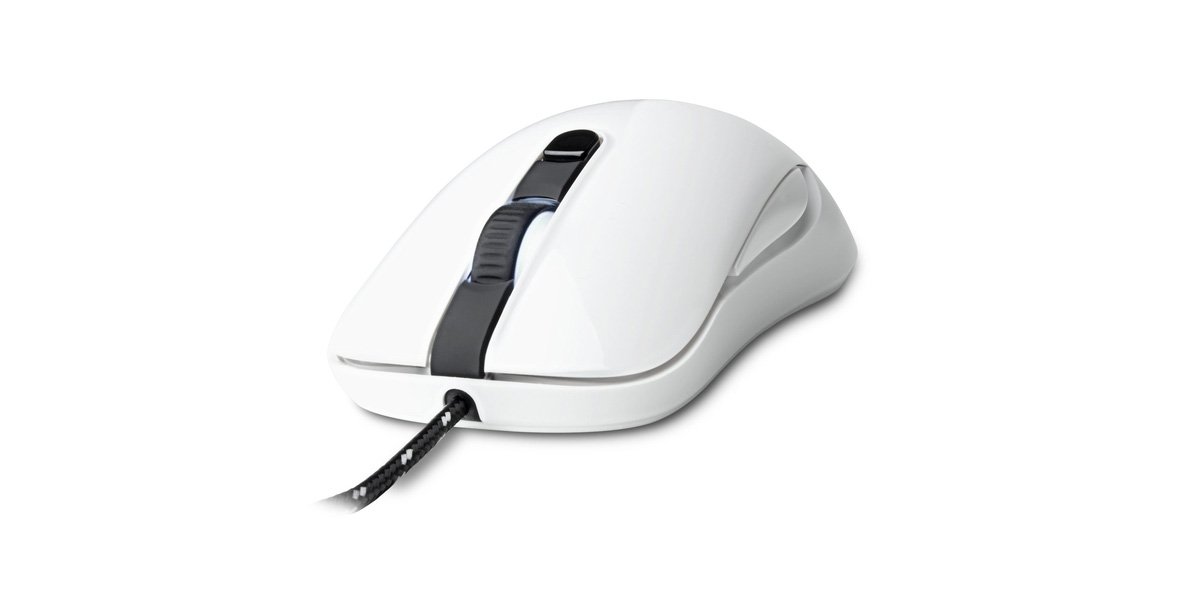
Image of the SteelSeries Kana Optical Gaming Mouse in white, showcasing its ambidextrous design, illuminated scroll wheel, and side buttons.
4. Fametrahana
4.1 Fifandraisana amin'ny Hardware
- Mitadiava seranan-tsambo USB misy eo amin'ny solosainao.
- Plug the USB connector of the SteelSeries Kana mouse into the USB port.
- Your operating system should automatically detect and install basic drivers for the mouse.
4.2 Software Installation (SteelSeries Engine)
To unlock the full customization potential of your SteelSeries Kana mouse, including CPI settings, button programming, macros, and LED intensity, install the SteelSeries Engine software.
- Tsidiho ny SteelSeries ofisialy webtranokala: steelseries.com/engine
- Download the SteelSeries Engine software compatible with your operating system (Windows or macOS).
- Araho ny toromarika eo amin'ny efijery hamita ny fametrahana.
- Once installed, launch the SteelSeries Engine to configure your mouse settings.
Fanamarihana ho an'ny mpampiasa Mac: Compatibility with macOS versions 10.9 and later for SteelSeries Engine 2.0 (required for Kana) has historically been inconsistent. Please check the official SteelSeries website for the latest software updates and compatibility information before installation.
5. Torolàlana miasa
5.1 Fampiasa fototra
- Hetsika: Ahetsiketsika eo amin'ny velarana iray ny totozy mba hifehezana ny cursor eo amin'ny efijerinao.
- Tsindrio: Use the left and right buttons for primary and secondary actions.
- Mihodina: Rotate the scroll wheel to navigate documents and web pages. Press the scroll wheel for its assigned middle-click function.
5.2 Adjusting CPI (Counts Per Inch)
The centrally located CPI toggle button allows you to switch between two pre-defined sensitivity settings instantly. The default CPI settings are optimized for gaming, but can be customized using the SteelSeries Engine software. The maximum CPI supported is 3200.
- Press the CPI toggle button once to switch to the alternate CPI setting.
- Press it again to revert to the previous setting.
5.3 Customizing with SteelSeries Engine
The SteelSeries Engine software provides extensive customization options:
- CPI Settings: Fine-tune or set custom CPI values beyond the pre-defined options.
- Button Programming: Assign custom functions, keyboard shortcuts, or macros to any of the 6 programmable buttons (including side buttons and scroll wheel click).
- Makro: Create and assign complex sequences of commands with precise timing control.
- LED Intensity: Adjust the brightness of the illuminated scroll wheel.
- Ohbfiles: Mamorona ary mitahiry matihanina maromarofiles for different games or applications, with automatic switching based on game triggers.
6. Fikojakojana
6.1 Fanadiovana ny totozy
To ensure optimal performance and longevity, keep your mouse clean.
- ivelany: Mampiasà lamba malefaka sady tsy misy loko kely dampened with water or a mild cleaning solution to wipe the surface of the mouse. Avoid harsh chemicals or abrasive materials.
- Optical Sensor: Gently clean the optical sensor lens on the underside of the mouse with a dry cotton swab or compressed air to remove dust or debris.
- Tongotra totozy: Ensure the mouse feet are clean and free of obstructions for smooth gliding.
Tandremo: Do not immerse the mouse in water or any cleaning solution. Avoid spraying liquids directly onto the mouse.
7. Famahana olana
| OLANA | Vahaolana mety |
|---|---|
| Mouse not detected / Not responding |
|
| Inaccurate or erratic tracking |
|
| Buttons not responding or performing incorrectly |
|
| SteelSeries Engine software not recognizing mouse (Mac OS) |
|
8. Famaritana
| Marika | SteelSeries |
| Laharana modely | 62029 |
| loko | White |
| Movement Detection Technology | Optical |
| Isan'ny bokotra | 6 (Azo fandaharana) |
| Orientation tanana | Ambidextrous (Left, Right) |
| Hardware Platform | PC |
| Karazana tariby | Nylon randrana |
| Lanja entana | 0.16 kg |
| Endri-javatra manokana | Ergonomic Design, Illuminated Scroll Wheel |
9. Warranty sy fanohanana
9.1 Fampahalalana momba ny fiantohana
The SteelSeries Kana Optical Gaming Mouse comes with a Garantie voafetra 1 taona manomboka amin'ny datin'ny fividianana. Ity antoka ity dia mandrakotra ny lesoka amin'ny famokarana sy ny asa tanana amin'ny fampiasana mahazatra. Tsy mandrakotra ny fahasimbana vokatry ny fampiasana diso, ny lozam-pifamoivoizana, ny fanovana tsy nahazoana alalana, na ny fikikisana sy ny rovitra mahazatra. Azafady mba tehirizo ny porofon'ny fividiananao ho an'ny fangatahana antoka.
9.2 Fanohanana ny mpanjifa
For technical assistance, warranty claims, or further information, please visit the official SteelSeries support webtranokala:
You can find FAQs, driver downloads, and contact information for customer service on their website.