
Sava lalana
This manual provides detailed instructions for the proper use and maintenance of your Royal DM2070 Electronic Organizer. Please read this manual thoroughly before operating the device to ensure safe and efficient use. Keep this manual for future reference.
Information momba ny fiarovana
- Aza apetraka amin'ny hafanana tafahoatra, ny tara-masoandro mivantana, na ny hamandoana be ny fitaovana.
- Fadio ny fandatsahana ilay fitaovana na iharan'ny fiantraikany mahery vaika.
- Aza manandrana manongotra na manamboatra ilay fitaovana. Alefaso amin'ny mpiasa mahay ny serivisy rehetra.
- Arovy amin'ny rano sy ranon-javatra hafa ilay fitaovana.
- Use only the specified battery type for replacement.
Fonosana fonosana
Hamarino fa ao anatin'ny fonosanao ny entana rehetra:
- Royal DM2070 Electronic Organizer
- Stylus (if applicable)
- Torolalana fanombohana haingana
- Karatra fiantohana
Hametraka
1. Fametrahana bateria
The Royal DM2070 requires batteries for operation. Follow these steps to install them:
- Tadiavo eo amin'ny lamosin'ilay fitaovana ny fonon'ny efitrefitra bateria.
- Atsofohy na atsangano ny fonony mba hanokafana ny efitrano.
- Insert the required batteries, ensuring correct polarity (+ and -) as indicated inside the compartment.
- Soloy tsara ny fonon'ny efitrefitra bateria.
2. Initial Power-On and Settings
After installing batteries, power on your device and configure basic settings:
- Tsindrio ary hazòny ny fahefana tsindrio ny bokotra mandra-pahazavan'ny efijery.
- The device may prompt you to set the date and time. Use the navigation buttons or stylus to enter the correct information.
- Confirm your settings to complete the initial setup.
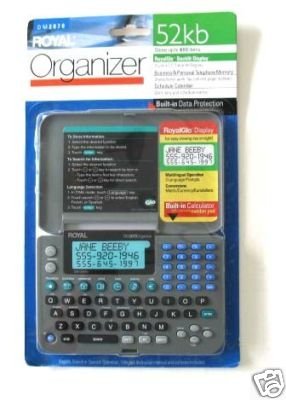
Image: Royal DM2070 Electronic Organizer. This image displays the device's front view, highlighting its screen and keypad, essential for navigation and data entry.
Torolàlana miasa
1. Fikarohana
The DM2070 features a keypad and potentially a stylus for navigation. Use the arrow keys to move between menu options and press Ampidiro or a designated selection button to confirm.
2. Entering Data
To enter information such as contacts, appointments, or notes:
- Navigate to the desired application (e.g., 'Contacts', 'Calendar', 'Notes').
- Select 'New Entry' or a similar option.
- Use the alphanumeric keypad to input text. Some models may offer an on-screen keyboard via stylus.
- Save your entry before exiting the application.
3. Using Applications
The DM2070 includes various applications:
- Kalandrie: View daily, weekly, or monthly schedules. Add and edit appointments.
- Fifandraisana: Store names, phone numbers, addresses, and email information.
- Fanamarihana: Create and manage text notes or memos.
- Kajy: Perform basic arithmetic calculations.
- Mpanova vola: Convert between different currencies (requires manual update of exchange rates on some models).
fikarakarana
1. Manadio ny fitaovana
To keep your DM2070 in optimal condition:
- Fafao ny efijery ary casing with a soft, dry, lint-free cloth.
- Ho an'ny marika mafy loha, kely dampkobanina amin'ny rano ny lamba; fadio ny akora simika mahery vaika na ireo mpanadio mikikitra.
- Ensure no moisture enters openings.
2. Fikarakarana bateria
- Soloy haingana ny bateria rehefa miseho ny famantarana ny bateria ambany.
- Esory ny batterie raha tsy ampiasaina mandritra ny fotoana maharitra ilay fitaovana mba hisorohana ny fivoahana.
Fanamboarana
If you encounter issues with your Royal DM2070, refer to the following common solutions:
| OLANA | Antony mety hitranga | vahaolana |
|---|---|---|
| Tsy mandeha ny fitaovana. | Batterie maty na diso napetraka. | Soloy vaovao ny bateria, hiantohana ny polarity marina. |
| Foana na mangatsiaka ny efijery. | Lozisialy glitch na ambany bateria. | Try a soft reset (refer to Quick Start Guide for specific button combination) or replace batteries. |
| Data loss. | Battery depletion or improper shutdown. | Ensure batteries are fresh. Always save data before powering off. |
| Tsy mamaly ny klavier. | Dust/debris under keys or internal issue. | Clean keypad gently. If problem persists, contact support. |
fepetra arahana
Key technical specifications for the Royal DM2070 Electronic Organizer:
| endri-javatra | antsipirihany |
|---|---|
| Marika | MPANJAKA |
| Laharana modely | DM2070 |
| Fitaovana fonony | hoditra |
| endrika | mpikarakara |
| Lanja entana | 181 g |
| Haben'ny entana (LxWxH) | 24.4 x 14.5 x 1 santimetatra |
| Kendrena mpihaino | BADY EFA LEHIBE |
Warranty sy fanohanana
The Royal DM2070 Electronic Organizer comes with a standard manufacturer's warranty. Please refer to the warranty card included in your package for specific terms and conditions. For technical support, service, or inquiries, please contact Royal customer service through the contact information provided on the warranty card or the official Royal website.